

文件结构
ab
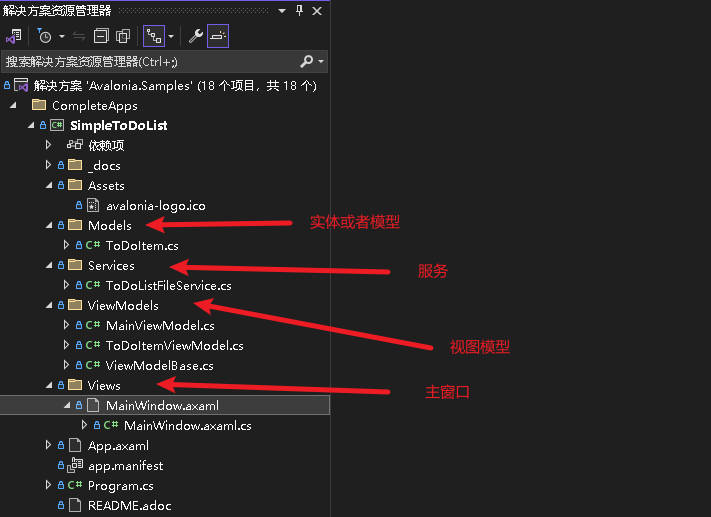
模型
ToDoItem
/// <summary>
/// This is our Model for a simple ToDoItem.
/// </summary>
public class ToDoItem
{
    /// <summary>
    /// Gets or sets the checked status of each item
    /// </summary>
    public bool IsChecked { get; set; }

    /// <summary>
    /// Gets or sets the content of the to-do item
    /// </summary>
    public string? Content { get; set; }
}
服务
ToDoListFileService
包含创建,加载,保存三个方法
public static class ToDoListFileService
{
    // This is a hard coded path to the file. It may not be available on every platform. In your real world App you may
    // want to make this configurable
    private static string _jsonFileName =
        Path.Combine(Environment.GetFolderPath(Environment.SpecialFolder.ApplicationData),
        "Avalonia.SimpleToDoList", "MyToDoList.txt");

    /// <summary>
    /// 保存list 到文件中 Stores the given items into a file on disc
    /// </summary>
    /// <param name="itemsToSave">The items to save</param>
    public static async Task SaveToFileAsync(IEnumerable<ToDoItem> itemsToSave)
    {
        // Ensure all directories exists
        Directory.CreateDirectory(Path.GetDirectoryName(_jsonFileName)!);

        // We use a FileStream to write all items to disc
        using (var fs = File.Create(_jsonFileName))
        {
            await JsonSerializer.SerializeAsync(fs, itemsToSave);
        }
    }

    /// <summary>
    /// Loads the file from disc and returns the items stored inside
    /// </summary>
    /// <returns>An IEnumerable of items loaded or null in case the file was not found</returns>
    public static async Task<IEnumerable<ToDoItem>?> LoadFromFileAsync()
    {
        try
        {
            // We try to read the saved file and return the ToDoItemsList if successful
            using (var fs = File.OpenRead(_jsonFileName))
            {
                return await JsonSerializer.DeserializeAsync<IEnumerable<ToDoItem>>(fs);
            }
        }
        catch (Exception e) when (e is FileNotFoundException || e is DirectoryNotFoundException)
        {
            // In case the file was not found, we simply return null
            return null;
        }
    }
}
视图模型
MainViewModel 主窗口包含的模型
ToDoItemViewModel 单个待办项目模型
ViewModelBase:视图横型基类
视图
MainWindow视图